Why Your Docker Image Didn’t Run Everywhere (And What CPU Architecture Has to Do With It)
Docker is often praised for its portability. We commonly hear phrases like:
“Build once, run anywhere.”
And for the most part, that promise holds true until it doesn’t.
I learned this the hard way when a Docker image that worked perfectly on one machine refused to run on another. Same Dockerfile. Same image. Same command.
The root cause wasn’t Docker itself. It was CPU architecture.
The Common Docker Misconception
Many developers assume that Docker images are universally portable across all machines and environments. The assumption usually goes like this:
“Since Docker packages the application and all its dependencies, the image should run on any system that has Docker installed.”
This is partially true.
Docker does make your application portable at the software and dependency level, but it does not automatically make it portable across different CPU architectures.
Why CPU Architecture Matters
Every Docker image contains compiled binaries and system libraries. These binaries are built for a specific CPU architecture, such as:
- amd64 - Most Intel and AMD-based desktops and servers
- arm64 - Apple Silicon (M1, M2, M3), modern ARM servers, Raspberry Pi 4
- arm/v7, arm/v6 - Older ARM devices
- ppc64le, s390x, riscv64 - Specialized architectures
If you try to run an image built for linux/amd64 on an arm64 machine, the container will fail because the CPU simply cannot execute those binaries.
This is why a Docker image may work perfectly on one system and fail immediately on another, even though Docker itself is installed correctly.
Seeing This Clearly on Docker Hub (NGINX Example)
Docker Hub actually makes this very transparent if you know where to look.
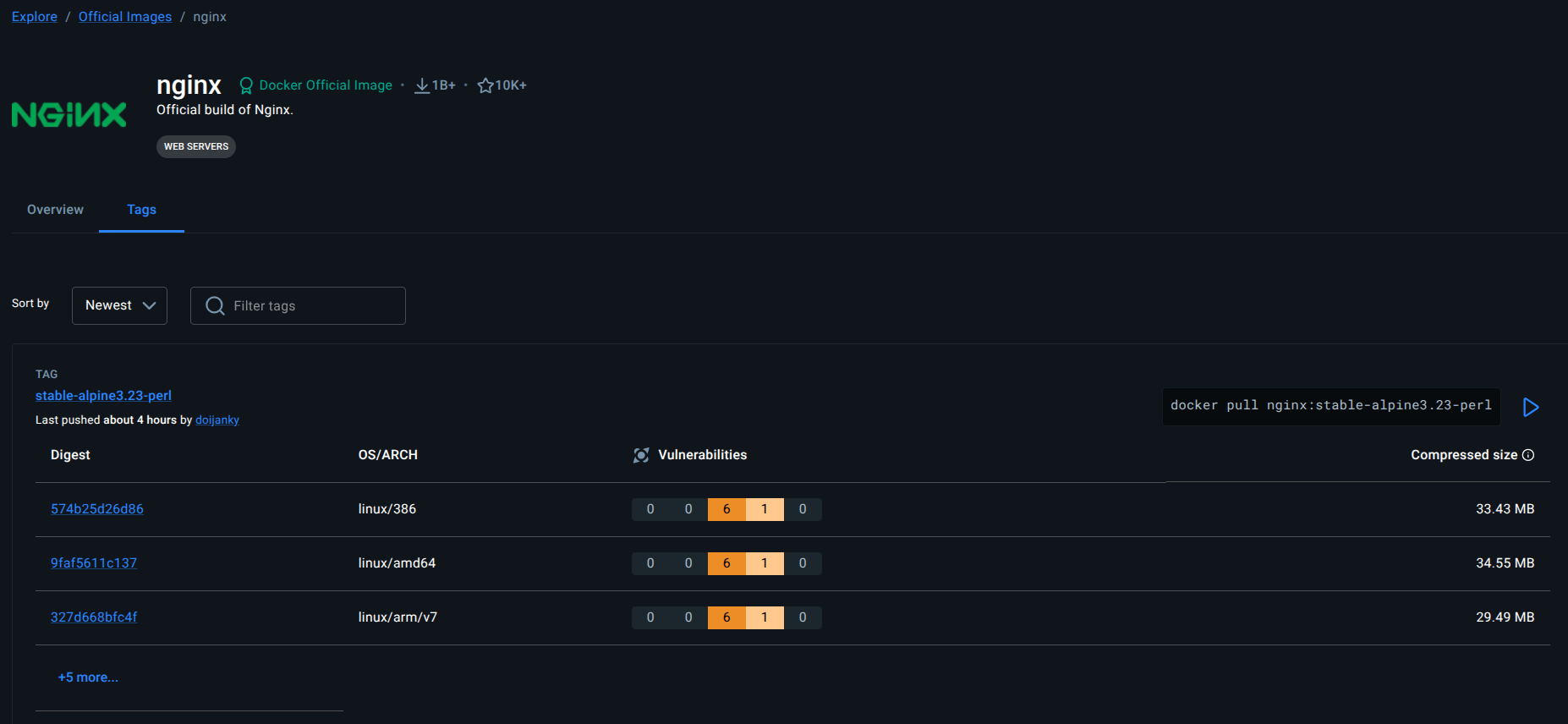
Below is a screenshot from Docker Hub showing the NGINX image tag
nginx:stable-alpine3.23-perl.
If you look at the OS/ARCH column, you can clearly see that the same NGINX tag has multiple architecture-specific variants, including:
linux/386linux/amd64linux/arm/v7linux/arm/v6linux/arm64/v8linux/ppc64lelinux/riscv64linux/s390x
Each row represents a different image build, compiled specifically for that architecture.
When you run:
docker pull nginx:stable-alpine3.23-perl
Docker automatically pulls the image variant that matches your machine’s architecture, if it exists.
If it doesn’t exist, the image won’t run unless you use emulation.
What Happens When You Run an Incompatible Image

When you attempt to run a Docker image built for a different CPU architecture, Docker usually warns you first and then fails at runtime.
For example, running an NGINX image built for linux/s390x on an amd64 machine results in the following output:
sameep@PC:~$ docker run claudiubelu/nginx:1.15-1-linux-s390x
WARNING: The requested image's platform (linux/s390x) does not match the detected host platform (linux/amd64/v3) and no specific platform was requested
exec /usr/sbin/nginx: exec format error
How Docker Handles Multi-Architecture Images
1. Multi-Architecture (Manifest Lists)
Many official images, like NGINX, are published as multi-architecture images. Under the hood, Docker uses a manifest list that points to different image digests for different architectures.
You don’t need to specify anything. Docker figures it out automatically.
2. Building for a Specific Architecture
If you’re building your own image and want it to run on a specific platform, you can explicitly define it:
docker buildx build --platform linux/arm64 -t my-nginx:latest .
This is especially important when:
- Building images in CI/CD
- Supporting Apple Silicon and x86 users
- Publishing images to Docker Hub
3. Emulation (QEMU)
Docker Desktop can emulate other architectures using QEMU. This allows you to run amd64 images on arm64 machines and vice versa.
However:
- Performance is slower
- Best suited for development and testing
- Not ideal for production workloads
Key Takeaways
- Docker images are not inherently architecture-agnostic
- Portability applies to software dependencies, not CPU instructions
- Always check the supported architectures on Docker Hub
- Use multi-architecture images or build explicitly for your target platform
Final Thoughts
Docker is still an incredibly powerful tool for creating reproducible, portable environments. But true portability requires awareness of the underlying hardware.
The next time a Docker image refuses to run on your machine, don’t immediately blame Docker. Check the architecture. Chances are, it’s doing exactly what it was designed to do.