From Docker Compose to AWS ECS: Deploying an Open-Source Microservices Application
Introduction
Docker Compose is great for local microservice development, but running services reliably in the cloud is a different challenge. I wanted to explore AWS ECS to understand container orchestration, networking, and deployments in a production-like environment.
This blog documents my hands-on experience deploying an open-source microservices application (Taiga) to ECS Fargate, focusing on architecture, container images, task definitions, and service deployment. Everything here is based on personal experimentation, shared to help others move from local Docker setups to cloud-managed containers with confidence.
Why I Chose Taiga
I chose Taiga, a free and open-source project management tool, because it is a real-world application with a microservices architecture. Taiga includes a backend API, frontend web interface, database, and optional background workers, making it a suitable candidate for deploying on ECS.
This multi-service setup provides opportunities to explore service-to-service communication, task orchestration, and deployment strategies in a production-like environment. Working with Taiga allowed me to test container networking, manage environment variables and secrets, and monitor logs across multiple services, giving a realistic view of how ECS handles scaling, fault tolerance, and networking in practice.
Running the Application Locally with Docker Compose
Before deploying to ECS, I started by running Taiga locally using Docker Compose, following the official repository configuration: taiga-docker. This allowed me to understand the application’s architecture, service dependencies, and environment requirements.
The main services that run when executing docker-compose up include:
- taiga-nginx - reverse proxy
- taiga-back - the backend API handling business logic and database interactions
- taiga-front - the web frontend providing the user interface
- taiga-db - the PostgreSQL database storing application data
- taiga-async - background task processor
- taiga-async-rabbitmq - message broker for background tasks
- taiga-events - event management service
- taiga-events-rabbitmq - message broker for events
- taiga-gateway - websocket server
- taiga-protected - service for protected endpoints
Running Taiga locally helped verify service dependencies, test configuration files, and ensure the application functioned correctly before moving to ECS. It also gave me insight into environment variables, port mappings, and how services communicate internally.
Target Architecture on AWS ECS
After verifying that Taiga ran correctly locally, I mapped the Docker Compose setup to AWS ECS Fargate. Each service became its own ECS task, allowing independent scaling and management:
- taiga-back -> backend task
- taiga-front -> frontend task
- taiga-nginx -> reverse proxy
- taiga-db -> managed RDS PostgreSQL (instead of containerized DB)
- taiga-async / taiga-async-rabbitmq -> background worker and message broker tasks
- taiga-events / taiga-events-rabbitmq -> event service and broker tasks
- taiga-gateway -> WebSocket gateway task
- taiga-protected -> protected endpoints task
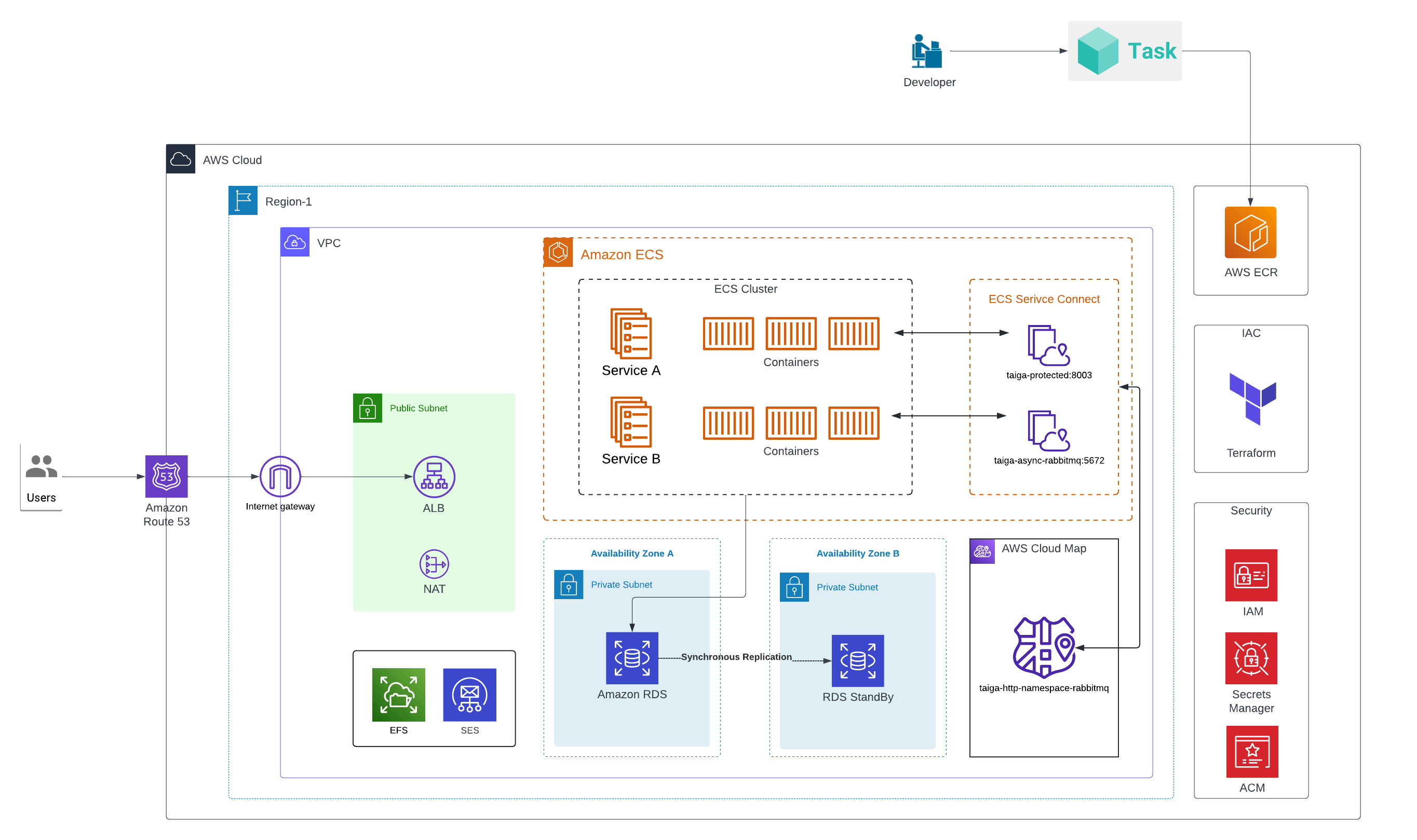
The ECS cluster uses Fargate launch type, removing the need to manage EC2 instances. Services are deployed behind an Application Load Balancer (ALB) for routing HTTP/HTTPS traffic, with taiga-nginx handling frontend proxying. All ECS services run in private subnets, while the ALB is placed in public subnets to handle external traffic. Internal service-to-service communication occurs entirely within the private network, ensuring secure and efficient connectivity.
The following diagram shows the ECS setup for Taiga, including tasks, ALB placement, and subnet configuration.
Container Images and Amazon ECR
For ECS deployment, each Taiga service and its dependencies needed to be available in a centralized container registry. I used Amazon ECR to host images for the frontend, backend, protected endpoints, events service, RabbitMQ, and Nginx. Using Terraform, I provisioned ECR repositories with KMS encryption, image scanning on push, and lifecycle policies to manage old images.
The Docker Compose file served as a blueprint for this process. I pulled official Docker Hub images for each service, including Taiga’s images and RabbitMQ/Nginx images, then tagged each image with a service-specific version before pushing them to ECR. For example:
taiga-front:6.8.1 → <ECR_URL>:front-6.8.1taiga-back:6.8.1 → <ECR_URL>:back-6.8.1rabbitmq:3.8-management-alpine → <ECR_URL>:rabbitmq-3.8-management-alpine
Terraform’s null_resource with local-exec handled authentication (aws ecr get-login-password) and pushed all images in parallel, making the process efficient and repeatable.
Deploying Services to ECS
With all container images available in Amazon ECR, I deployed the Taiga services to AWS ECS Fargate. I created task definitions for each service, specifying CPU and memory allocations appropriate to the workload. Each task included environment variables, secrets, and logging configuration using Amazon CloudWatch Logs, ensuring container output could be monitored and debugged.
ECS services were then created from these task definitions, with desired counts configured to maintain service availability. Deployment strategies were set to allow rolling updates, minimizing downtime during changes. While I did not enable circuit breakers for this setup, ECS supports them for handling failed deployments gracefully.
For networking, all ECS tasks ran in private subnets. Public-facing services like the frontend were routed through an Application Load Balancer (ALB) in public subnets, while internal services communicated securely via Service Connect. Security groups ensured only the ALB could reach public services, while internal ports allowed RabbitMQ and backend tasks to communicate without exposing them externally.
I verified the deployment using multiple forms of evidence:
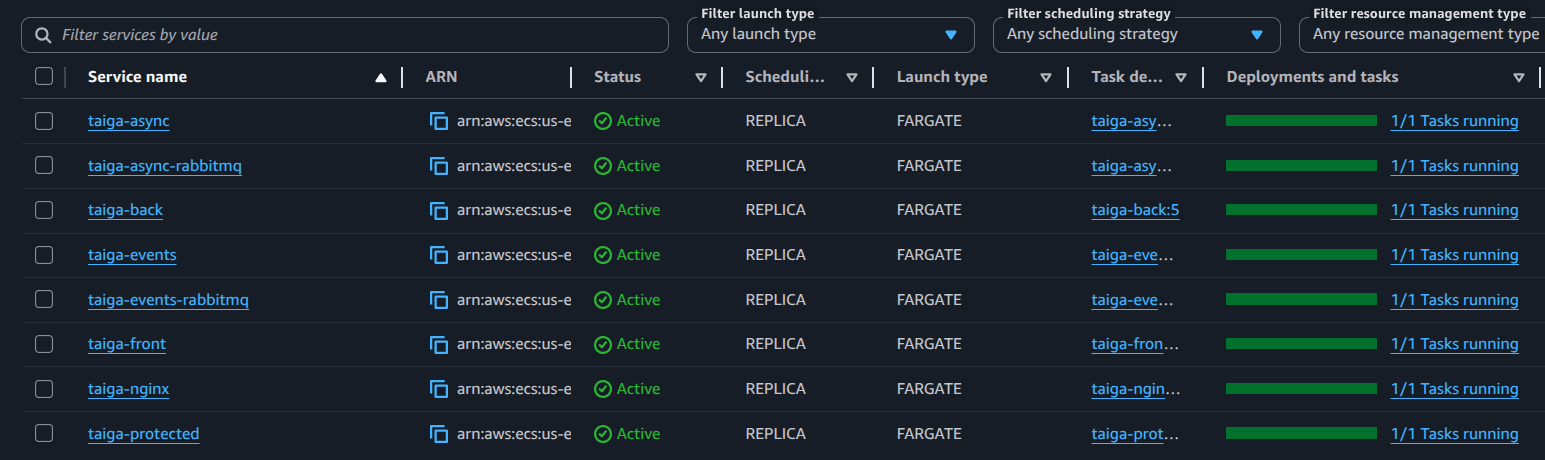
- ECS services screenshot showing tasks running and healthy:
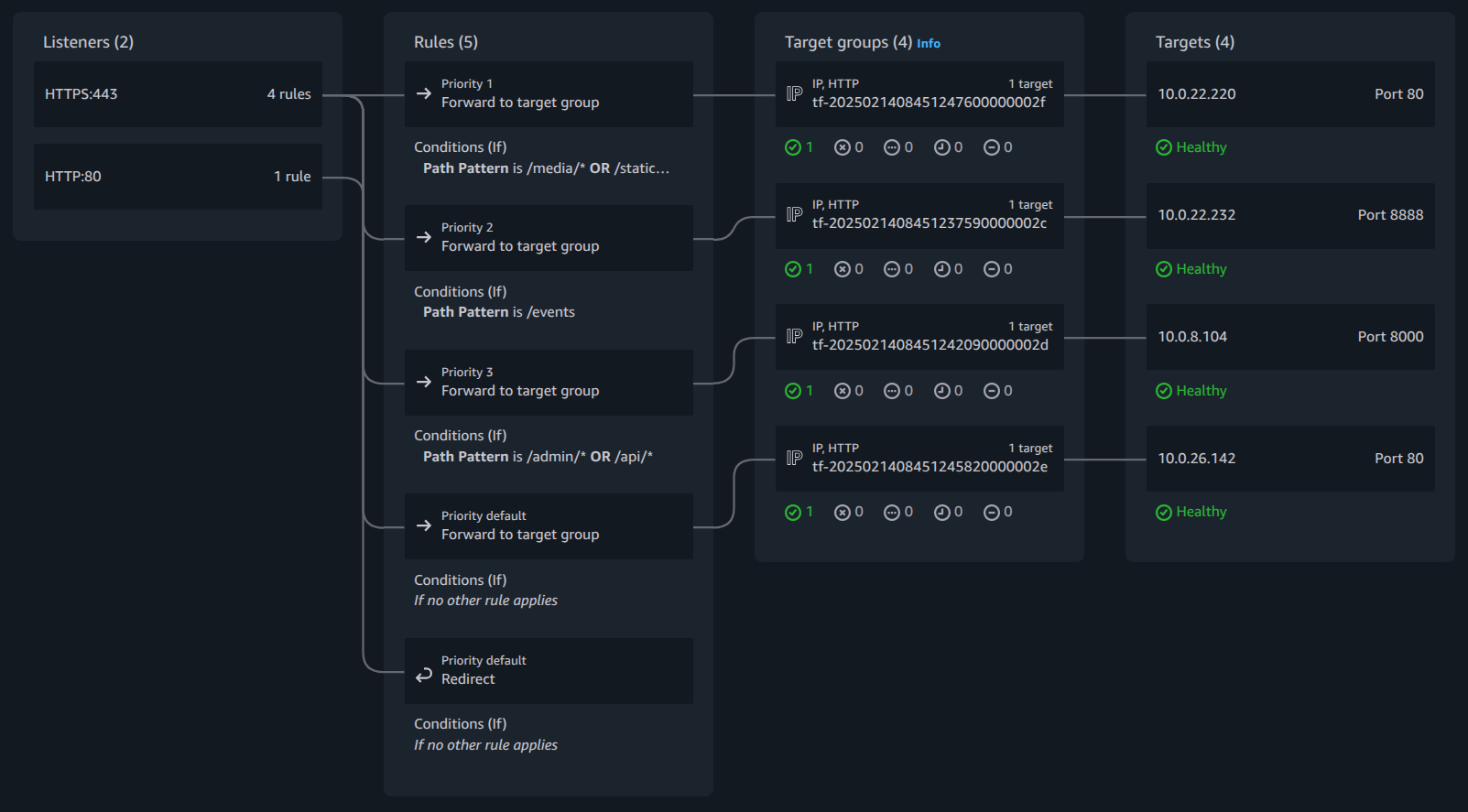
- ALB target group screenshot confirming traffic routing:
- Terraform snippet for task definitions, demonstrating CPU/memory, container image, and port mappings:
module "ecs_service_taiga_front" {
  source  = "terraform-aws-modules/ecs/aws//modules/service"
  version = "5.11.2"
  create  = true

  name        = "taiga-front"
  cluster_arn = module.ecs.cluster_arn

  cpu          = 512
  memory       = 1024
  network_mode = "awsvpc"

  # Enables ECS Exec this helps in interacting with containers directly
  enable_execute_command = true

  wait_for_steady_state = true

  subnet_ids            = local.private_subnet_ids
  create_security_group = false
  security_group_ids    = [aws_security_group.asg_sg_ecs.id]

  # Container definition(s)
  container_definitions = {

      (local.ecs.container-front) = {
      essential = true

      image = "${local.ecr_repository_url}:front-6.8.1"

      port_mappings = [
          {
          name          = local.ecs.container-front
          containerPort = local.ecs.container_port_front

          protocol = "tcp"
          }
      ]
      readonly_root_filesystem = false

      environment = [
          {
          name  = "TAIGA_URL"
          value = local.taiga_url
          },
          {
          name  = "TAIGA_WEBSOCKETS_URL"
          value = local.taiga_websocket_url
          },
          {
          name  = "TAIGA_SUBPATH"
          value = ""
          },
          {
          name  = "PUBLIC_REGISTER_ENABLED"
          value = local.ecs.front_public_register_enabled
          }
      ]
      }
  }

  service_connect_configuration = {
      namespace = aws_service_discovery_http_namespace.this.arn
      service = {
      client_alias = {
          port     = local.ecs.container_port_front
          dns_name = local.ecs.container-front
      }
      port_name      = local.ecs.container-front
      discovery_name = local.ecs.container_discovery_name_front
      }
  }

  load_balancer = {
      service_1 = {
      target_group_arn = module.alb.target_groups["front_ecs"].arn
      container_name   = local.ecs.container-front
      container_port   = local.ecs.container_port_front
      }
  }
}
This deployment gave me practical experience with ECS task definitions, service scaling, ALB routing, and secure networking, while bridging the gap between local Docker Compose setups and cloud-native deployments.
Lessons Learned
Moving a real microservice application from Docker Compose to Amazon ECS highlighted how different local and cloud environments can be. ECS enforces explicit configuration-networking, IAM roles, logging, and environment variables must all be defined clearly, which initially felt restrictive but ultimately led to more predictable deployments.
One of the biggest surprises was how much IAM and networking influence container behavior. Many failures were not application bugs, but permission or connectivity issues that only surfaced at runtime. ECS task events and CloudWatch Logs became essential tools for troubleshooting.
This setup reinforced a few best practices: design services to tolerate dependency delays, treat health checks and logging as first-class citizens, and keep task execution and task roles clearly separated.
For anyone planning a similar move, starting with a non-trivial open-source application is extremely valuable. It exposes real-world edge cases that simple demos often hide.
Additional Resources
-
Taiga Docker (Official Repository):
https://github.com/taigaio/taiga-docker
This repository was used to understand Taiga’s container structure, service dependencies, and environment configuration before deploying the application to Amazon ECS. -
Follow-up Blog: Problems I Faced and How I Solved Them on ECS
This blog dives into ECS-specific challenges encountered while deploying multi-service applications like Taiga, including health check failures, IAM permission issues, secrets management, and ECR image pull errors. It explains the diagnosis and solutions in detail.